
New Drop-off Day and NetClient Portal Updates
Welcome to another Tax Season issue of Beyond the Numbers. We’re pleased to announce an upcoming Document Drop-off Day event this year for those of you submitting paper documents to us. If you’re using our NetClient portal, we have some new helpful links, including direct payment links, and some pointers and tutorial videos for you. Read on for those resources.
Document Drop-Off Day, Saturday, February 28

You asked—and we listened! All Integrated Tax Services clients are invited to our:
ITS Tax Document Drop-off Day!
Saturday, February 28
11:00 a.m. – 1:00 p.m.
Hurley Building Parking Garage
275 West Third Street
Vancouver, WA 98660
Simply drive through our garage and hand off your tax documents and signed forms from the comfort of your vehicle. Look for our welcome sign at the garage entrance on the east side of the Hurley Building (Washington Street entrance).
All clients are welcome to stop by with tax documents or questions—we’d love to see you!
NetClient Tutorial Videos Available
If you have received your tax packet and would like help navigating NetClient, we encourage you to visit the Resources section of our website to find easy-to-follow tutorial videos to guide you step by step. If you are unable to access your NetClient Portal, please contact Client Services for assistance.
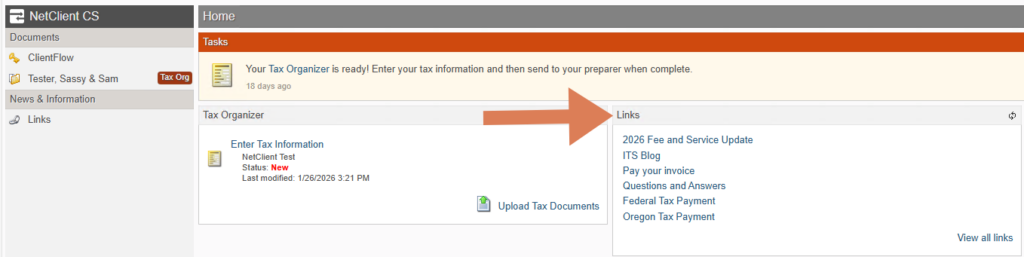
New Portal Links
The following new links are now available in your NetClient Portal, including a link to the IRS payment site:
- 2026 Fee and Service Update
- ITS Blog: Beyond the Numbers
- Pay Your Invoice
- Questions and Answers
- Federal Tax Payment
- Oregon Tax Payment
Portal Pointers
Your NetClient Portal is your secure hub for working with us. Inside, you’ll find:
- Your Checklist (previously called your Organizer)
- Your Questionnaire
- A secure place to upload and send documents
- A copy of your original Engagement Letter and Consent to Disclose, if applicable
For the best experience, please note the following tips:
- Chrome and Firefox are the preferred browsers. Please avoid using Safari.
- Access NetClient using a desktop or laptop computer, not a mobile device or tablet.
- File types accepted: PDFs are preferred; Word and Excel are okay
- Avoid image files such as: JPG, PNG and TIFF
- Do not upload files in a zipped folder
- When you have updated your documents and are ready for us to begin preparing your return, click the “Send to Preparer” button. NOTE: You can only click this button once. If you have additional documents to upload, see the How to Upload Additional Documents.
We Hear You
We sincerely apologize to clients who have experienced technical issues accessing or uploading documents to the NetClient Portal. We understand how frustrating this can be.
Please rest assured that these challenges have not impacted the security of your documents.
Thank you for your valuable feedback. We hear you, we appreciate you, and we are actively exploring all available solutions with Thomson Reuters to improve the NetClient Portal experience.
Other Ways to Get Us Your Documents
While we highly encourage you to use the secure NetClient Portal, you can also submit tax documents to us in the following ways:
- Mail: Copies only, please. We recommend a tracked service (e.g., USPS Certified Mail).
- In-Person Drop-Off: Copies may be dropped off during business hours. Our tax season business hours are:
- Monday, Tuesday, Thursday, and Friday, 8:00 a.m. to 5:00 p.m.
- Wednesday 8:00 a.m. to 6:00 p.m.
- Starting March 7, we are open on Saturdays from 9:00 a.m. to 1:00 p.m.
Tax Season Humor

Please don’t hesitate to reach out—we’re here to help.
Thank you!
Your Integrated Tax Services Team